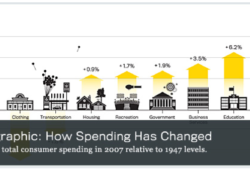
Mashable shows a very nice infographic under the headline “State of the Internet Explained In One Giant Infographic.” The interesting twist in this graph is that it does not try to show big numbers or complex percentages, but reduces everything to a random crowd of 100 people. Each person is represented by one circle. All data and relationships are expressed using these circles. However, I am not sure why this metaphor is broken in the middle by displaying an ugly pie chart. Labeling is clear and fonts are well chosen. Well done!
It is not uncommon to find discussion spaces with hundreds to thousands of messages and participants. User-generated content (UGC) is the driving force behind all Web 2.0 applications. How do you visualize such an exchange of ideas?
Today, I found tldr which is “is an application for navigating through large-scale online discussions. The application visualizes structures and patterns within ongoing conversations to let the user browse to content of most interest. In addition to visual overviews, it also incorporates features such as thread summarization, non-linear navigation, multi-dimensional filtering, and various other features that improve the experience of participating in large-discussions.”
Publication about the project: Narayan, Srikanth and Cheshire, Coye - “Not too long to read: The tldr Interface for Exploring and Navigating Large-Scale Discussion Spaces”. The 43rd Annual Hawaii International Conference on System Sciences - Persistent Conversations Track - Jan 2010.
As reported on Mashable and elsewhere, TrendStream, who publishes the Global Web Index, has created an interesting visualization of the penetration of different social technologies in major markets around the globe. The data come from interviews with 32,000 Internet users in 16 countries. The PDF shows labeled pie charts with overlap. Displaying a grayed out 100% pie and then let each pie piece start at the same baseline is certainly a new way of allowing comparisons which are usually hard in pie charts if the differences are not obvious. The legend states that “The size of the arch’s, represents the audience volume in millions.” [Sentence unaltered from source.] The problem I see is that the thickness of the arches is different in order to improve display, but the thickness seems to represent quantity as well which is apparently not the case, or is it? The display implies two dimensions, angle of the arch and thickness of the arch, but the data is only one-dimensional.
It is quite rare that data visualization topic makes it into the headlines, but a recent dispute between data visualization guru Edward Tufte and Microsoft made it into Slashdot. According to Wikipedia, “a Sparkline is a type of information graphic characterized by its small size and data density. Sparklines present trends and variations associated with some measurement, such as average temperature or stock market activity, in a simple and condensed way. Several sparklines are often used together as elements of a small multiple.” Read more about Sparklines in Edward Tufte’s book Beautiful Evidence (page 62).
An entry in Tufte’s blog titled “Microsoft patent claim for ’sparklines in the grid’” outlines the conflict about intellectual property rights resulting from a patent application which had been filed on May 7, 2008 by Microsoft employees, claiming various aspects of Sparklines’ implementation in Excel 2010.
I found a nice example of how to visualize information flow in science. The Eigenfactor Project (data analysis) and Moritz Stefaner (visualization) cooperated on this interactive visualizations which is based on the Eigenfactor™ Metrics and hierarchical clustering in order to explore emerging patterns in citation networks. It shows citation patterns over time, a clustering and maps based approximately 60,000,000 citations from more than 7000 journals over the past decade. Interestingly, a recent blog at BMJ Group blogs by Richard Smith “The beginning of the end for impact factors and journals” discussed the end of impact factors as a measure of research quality and their substitution by article-level metrics (see Next Generation Science)
Today, I would like you to point to another useful online course developed by Riccardo Mazza, Dominique Brodbeck, Michele Lanza and Richard Wettel. The Demo Module: VizInfo provides an introduction to the main concepts and techniques on Information Visualization. They present many topics, such as illustrate data and relationships between data elements, the basic principles of infovis, different usage of infovis (presentation, explorative analysis, confirmative analysis), strategies and techniques that help us transform large multidimensional datasets into structures that are conducive to visualization and much more. Check it out!
The New York Times had a nice piece about logo art on May 31, 2009. Bill Marsh compiled a list of recent logo changes of big corporations, like Walmart, Kraft, Cheer, Sysco and Blackwater and discovered some commonalities among their redesigns. If you read the article carefully, you will see that the new logos actually apply many of the regular typographical rules which are often violated in logo design to make them “loud” and supposedly memorable. Interestingly, the trend towards all lower case seem to match the writing style of microbloggers who use their cell phones and other devices to just type along without considerations for capitalization. Happy reading!
In order to access DemoModule: VizBiz you will need to login as guest. The instructors of this online course, Martin Eppler, Remo Burkhard, Ralph Lengler & Patricia Klarner will give you a brief overview on the fascinating world of visualization for Business and Communication. Some of the topics cover (1) how we perceive and process visual information in the brain; (2) how to improve your (passive) visualization skills is by assessing visualizations from others; (3) exploring the differences between Information Visualization and Knowledge Visualization; (4) knowledge-intensive issues that can be made clearer through visualization methods; and (5) benefits of visualization in the context of strategic management.
I have discovered a very informative Website which compiles a comprehensive list of visualization resources. WikiViz was created and is maintained by Riccardo Mazza and is hosted by Institute of Innovative Technologies at the University of Applied Sciences of Southern Switzerland. For instance, under books, it lists the classics, like Bertin, Tufte and Harris. Or under videos it lists famous TED talks by Hans Rosling and Steven Johnson. Check it out!
There are some typographical rules when it comes to dashes, following or violating them can be easily spotted and is often used as first indicator for typographical sloppiness. While there are many different dashes, I only want to focus on the most common ones: hyphen, en-dash and em-dash.
The em-dash is often misused for a comma and overused “Dashes surround a series punctuated by commas: ‘The governor will face many problems—unemployment, declining revenue and rising costs—in the election year.’ Also use dash to mark an abrupt change in continuity of expression: ‘The balance of payments is—but you know all that.’ … Do not use a dash alongside a comma, a semicolon or a colon. … Avoid [] dashes in headlines because they are ungainly in large type” (source: NYT Manual on Style and Usage).
An em dash is ASCI character 151, so Alt+0151 (on the numeric keypad) inserts it. If its not available in your program, for instance in ASCII email messages, it is common to use to two hyphens.
The en-dash is also called the figure dash because it is used between numbers, like in phone number 724-934-0706 or to denote numerical ranges. If not available you can use a hyphen or a minus sign instead.
The hyphen is used for hyphenation—I guess you would have figured that—but, it can also be used between numbers in cases when an en-dash is not available and to hyphenate compound words.
The em-dash or m-dash has the width or the lower case “m” and the en-dash or n-dash has respectively the width of the lower case “n.” The en-dash is wider than a hyphen. There should be no spaces before and after an em-dash.